
Troubleshooting Meta CAPI: what we covered in our webinar
Why deduplication breaks, how event match quality affects your spend, why Meta over-reports, and the logging that makes the next problem faster to fix.
Timo and I ran a webinar on troubleshooting Meta’s Conversions API. This is a recap of what we covered. We built the session around what people told us when they registered, so it wasn’t a “how to set up CAPI” walkthrough. Most of the room already had CAPI live and running, and the questions were about what to do when it breaks quietly and you can’t tell whether the problem sits in Meta, GTM, or your server.
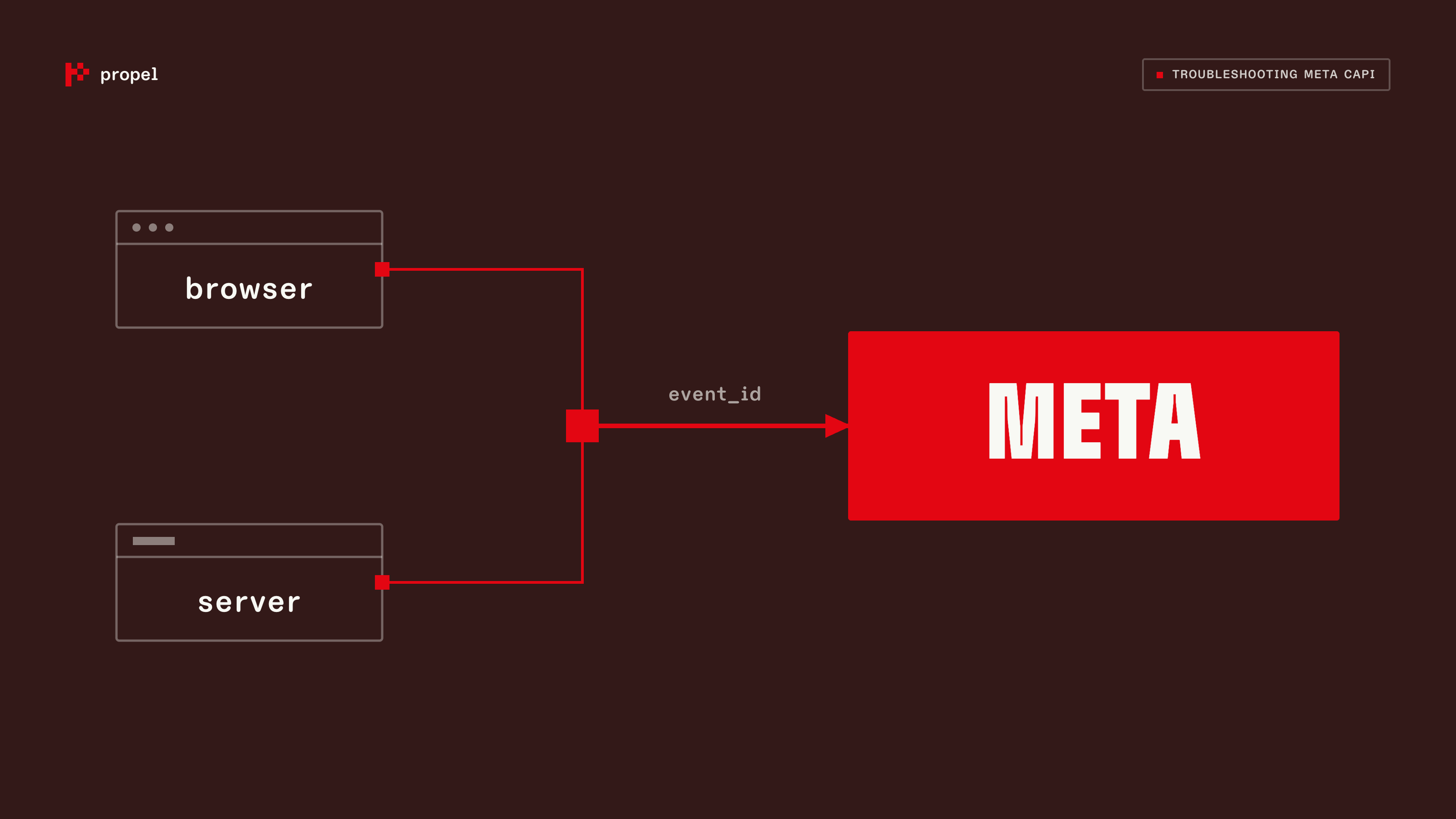
Three problems came up more than any others: events being counted twice, match quality quietly eroding, and Meta reporting more conversions than a company’s own data. We took each in turn, then Timo covered what to put in place now so the next problem is faster to diagnose.
Deduplication is the most common problem, and it usually comes down to the event ID
Most companies send the same conversion twice on purpose: once from the browser pixel, once from the server. That’s a good setup. The browser sees things the server can’t, and the server sees a longer customer journey, lets you enrich the user, and isn’t limited by consent or ad blockers the way the browser is. For it to work, Meta has to recognise the two hits as one event and drop the duplicate.
It deduplicates on the event ID. There are other fields in the payload, but the ID is the one that matters, combined with the event name, and it has to be identical on both the browser and the server hit. The way this breaks in practice is organisational: one team sets up the client side in GTM, another sets up the server side, and each generates its own “unique” ID from timestamps or something else. Both are unique. Neither matches. The clean fix is to generate the ID on the client and pass it to the server, so the server picks up the same value and sends it back.
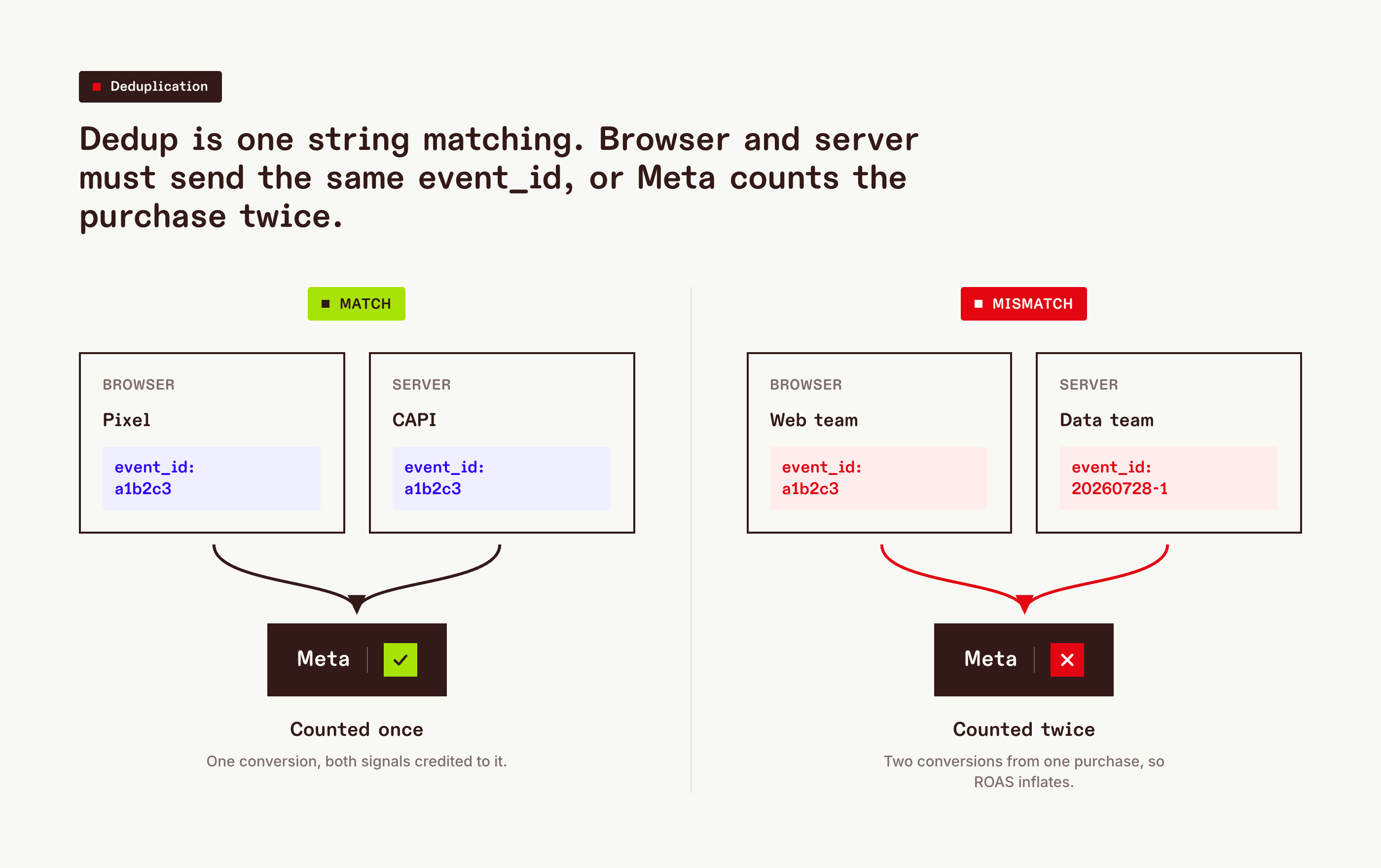 The ID has to be generated once, upstream of both senders. Two teams inventing their own format is the most common way dedup quietly fails.
One more failure mode worth watching: timing. If the server event arrives long after the browser event, deduplication can fail. In our experience the safe rule is to send both as close together as possible; if you batch server events (say, a daily send from BigQuery), that gap alone can be enough to break the match.
You can see the coverage percentage in Meta, but not which specific events were duplicated, which is exactly the thing you’d want when debugging.
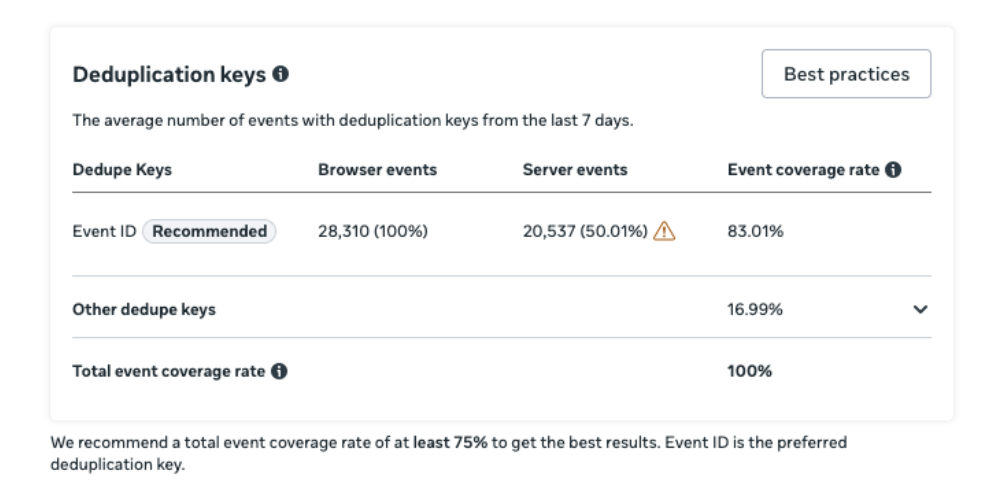
So you need your own client-side logs to compare the two streams event by event. As a rule of thumb you want deduplication coverage near 100%, and you usually want more server events than browser events, because the server hit is the more complete and more reliable of the two.
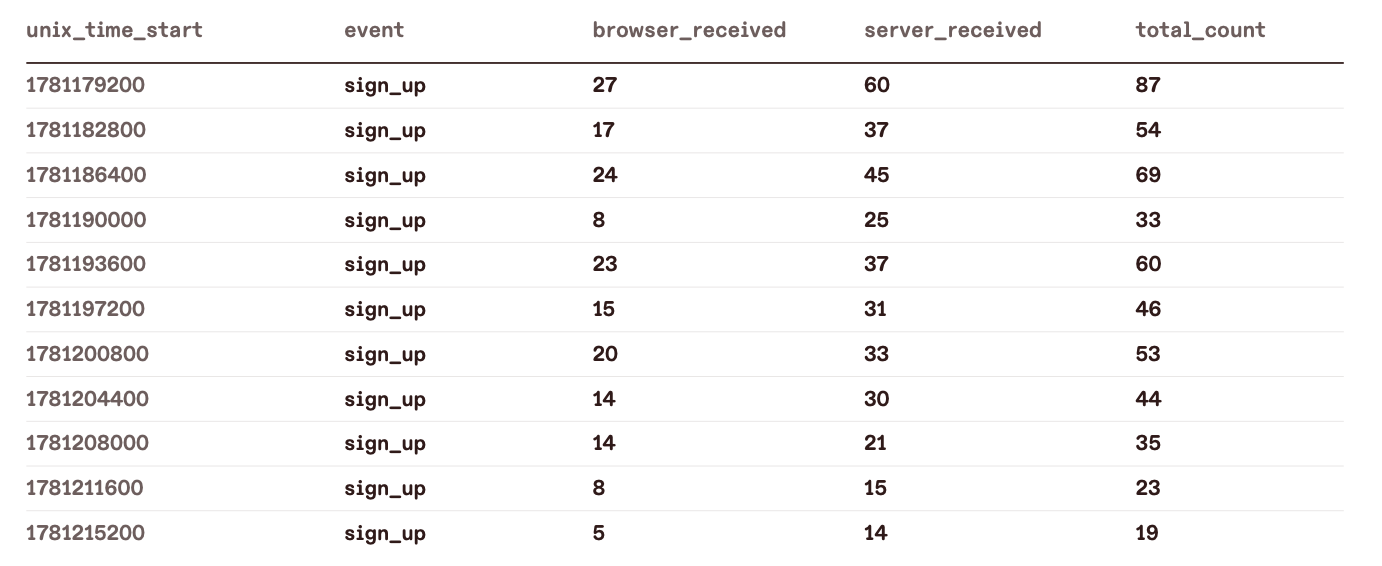
A quick way to catch double-counting without any logging: in the events view, segment first conversions against all conversions on an event most users only fire once, like a sign-up. If sign-ups show more “all” conversions than “first” conversions, more sign-up events are firing than there are people signing up. That doesn’t tell you where the duplication is, browser, server, or both, but it tells you to go look.

Low event match quality doesn’t just weaken optimisation, it can cut your spend
Event match quality is how well Meta can tie a conversion back to someone it showed your ad to. The more identifying information you pass, and the better its quality, the higher the score. Data teams tend to be relaxed about this, the same way they tolerate 75% quality on behavioural data, because they’re used to messy data being fine. On CAPI it isn’t just a data-quality number. It changes what the platform is willing to spend.
Here’s a case that made it concrete. A client changed their consent banner. Consent to advertising cookies dropped by around 40%, which meant that share of client events stopped carrying the click ID. Within about ten days, spend had roughly halved. The mechanism: Meta could now attribute far fewer conversions, so the CAC it saw went up, and to stay under the target CAC set in the campaign it pulled back budget on its own. Nobody had told marketing the banner was changing, so from their side it looked like the campaigns fell off a cliff for no reason. That’s a hard thing to debug, because a consent change and a spend drop don’t look connected, and it’s not the usual “tracking looks a bit lower” symptom, it’s a drop in real delivered volume.
Match quality isn’t a dashboard number. It’s part of what the platform bids with, so when it drops, your spend can drop with it.
Two things follow. First, match quality is worth monitoring continuously, not checking once, because it can be fine one day and not the next. Second, it’s per-event, so treat events differently. A page view fired server-side carries almost no identifying information and will score badly, and that’s fine, because you shouldn’t be optimising for page views anyway. Purchases and other high-value events are where you want the score to be strong. A useful gut check we use is to aim above 8 on the events that matter, while remembering it depends on how many events you have: if you convert rarely, matching as many as possible matters far more.
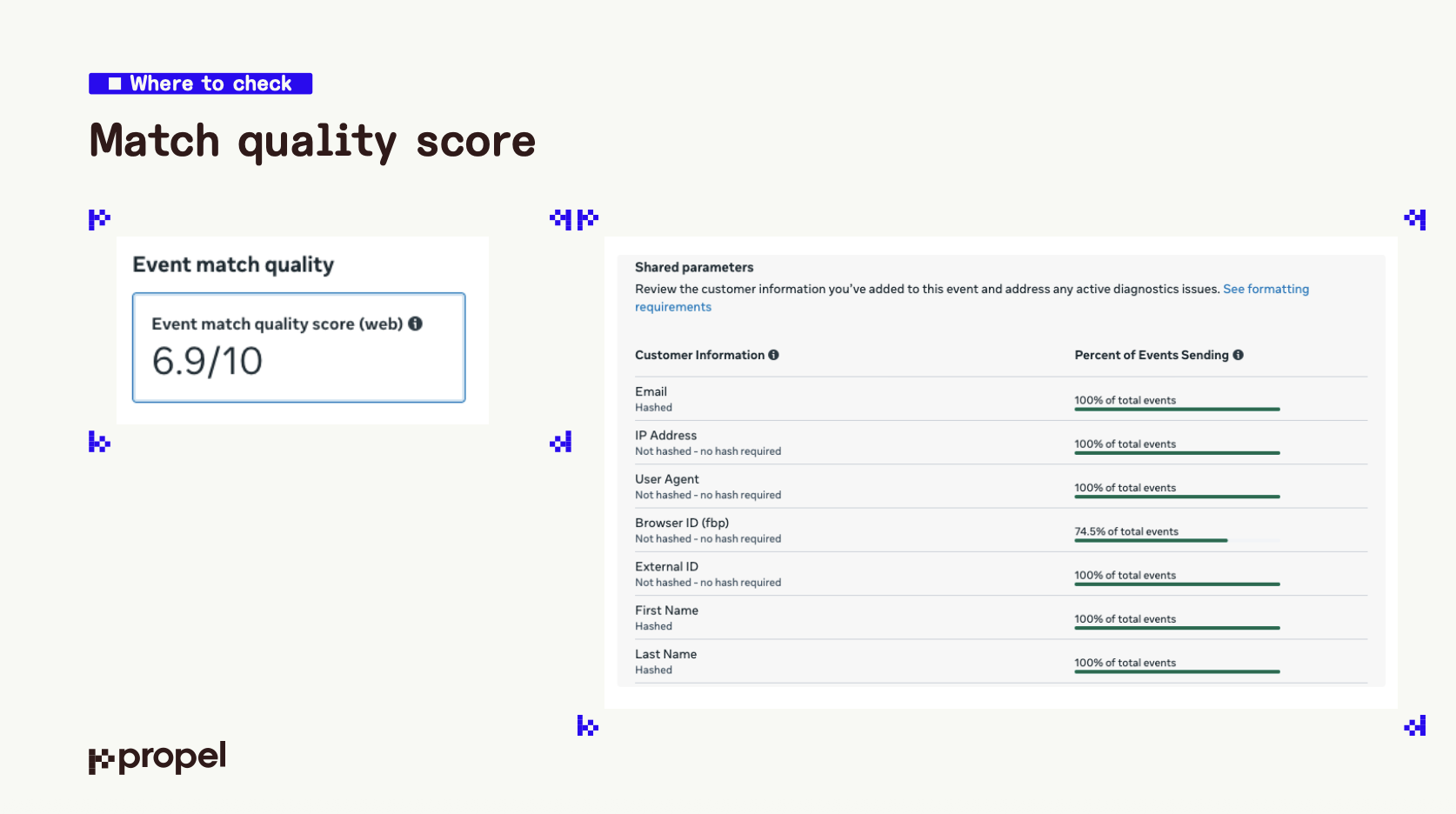
There’s a subtler trap. A high score can mean you’re matching the wrong people. Meta is better at matching consumer identities than business ones, so a B2B advertiser can end up matching the personal-Gmail signups, the least valuable ones, and missing the business buyers. A good score on the wrong conversions still costs you.
The takeaway for what you send server-side: only add an event, or a field, if it brings something the client event doesn’t. Usually that’s more identifiers so Meta can match more, or a value you can only compute on your server, like a predicted LTV or a lead score. Mirroring every client event onto the server “just in case” adds cost and noise, not signal.
Meta reports more than your first-party data, and that’s mostly working as intended
This is the discrepancy we get asked about most. Before blaming it, it helps to know that Meta’s Events Manager and a tool like Google’s conversion reporting are counting different things. Meta shows everything that was sent to it. Google shows what it was sent and could attribute to a campaign. So they will never line up, and that’s before you get into attribution windows.
The bigger point is that Meta reporting more conversions than your own analytics is usually a feature, not a bug. The reason you send server-side events with all that identifying information is to help Meta find more good users, that’s a campaign-optimisation job, not a reporting one. It is not claiming every one of those conversions for itself as a reported result. Comparing Meta’s number to your GA4 or Amplitude number as if they should match is comparing two different jobs.
The place this becomes useful rather than confusing is Meta’s attribution-setting breakdown, where you can split conversions into post-click, post-engagement, and post-view. Your first-party tools, GA4, Amplitude, Snowplow, only ever see post-click. So anything that isn’t post-click will never appear there, and chasing that gap is chasing something that can’t reconcile by definition.
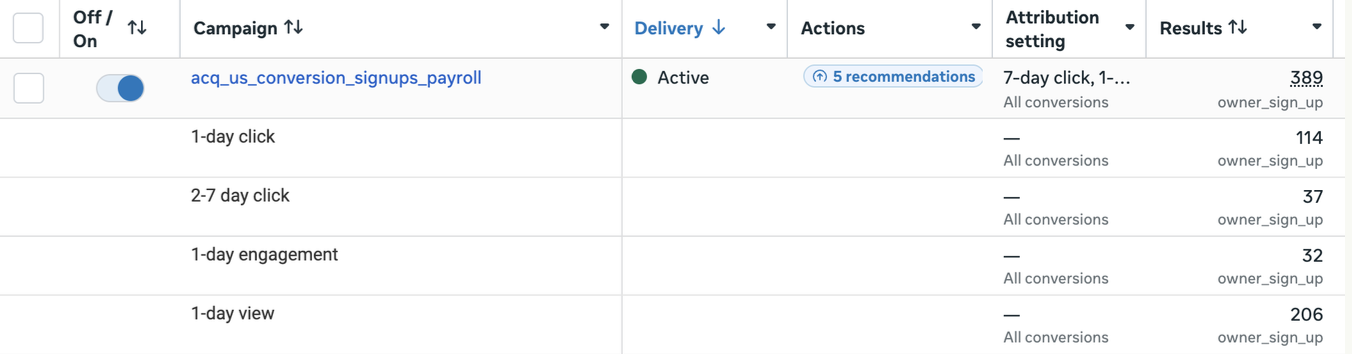
Post-view is worth reading closely, in context. On one client running the same setup across markets, the market where they had the strongest brand showed around 80% of Meta conversions as post-view, while other markets were the reverse, mostly post-click. That doesn’t prove the post-view conversions weren’t incremental, but a number that high, in a specific market, is a flag worth acting on. For that client we used it to prioritise an incrementality test in that market, because we needed a CAC we could trust rather than one leaning on “would these people have converted anyway”.
The fix for next time is logging what you send, not just what you track
Most of the session was about problems people already had. Timo’s point at the end was about making the next one more transparent: get visibility into the things the ad platforms don’t give you visibility into.
Concretely, that means logging not only your own tracking but everything you send to the ad platforms, with all the parameters, into a data warehouse like BigQuery. You can write it from server-side GTM, or from an event pipeline like RudderStack or Segment if you already run one. Once it’s there, you can put tests and alerts on top, so if click IDs stop coming through or a parameter goes missing, you know immediately instead of discovering it in a spend report weeks later.
A couple of debugging notes that came out of the questions. A 200 response from Meta means “received and looks OK on first pass”, not “processed successfully”, we’ve seen events return 200 and still have problems downstream, so inspect the payload you actually sent rather than trusting the status code. And logging the client side is genuinely harder than the server side: there’s no direct path from client-side GTM into BigQuery, and routing it through GA to store it inflates your analytics and annoys the marketing team. It’s cleaner on RudderStack or Segment, but plenty of teams are on GTM and GA4, so we’re planning a proper guide on how to log client-side events for troubleshooting.
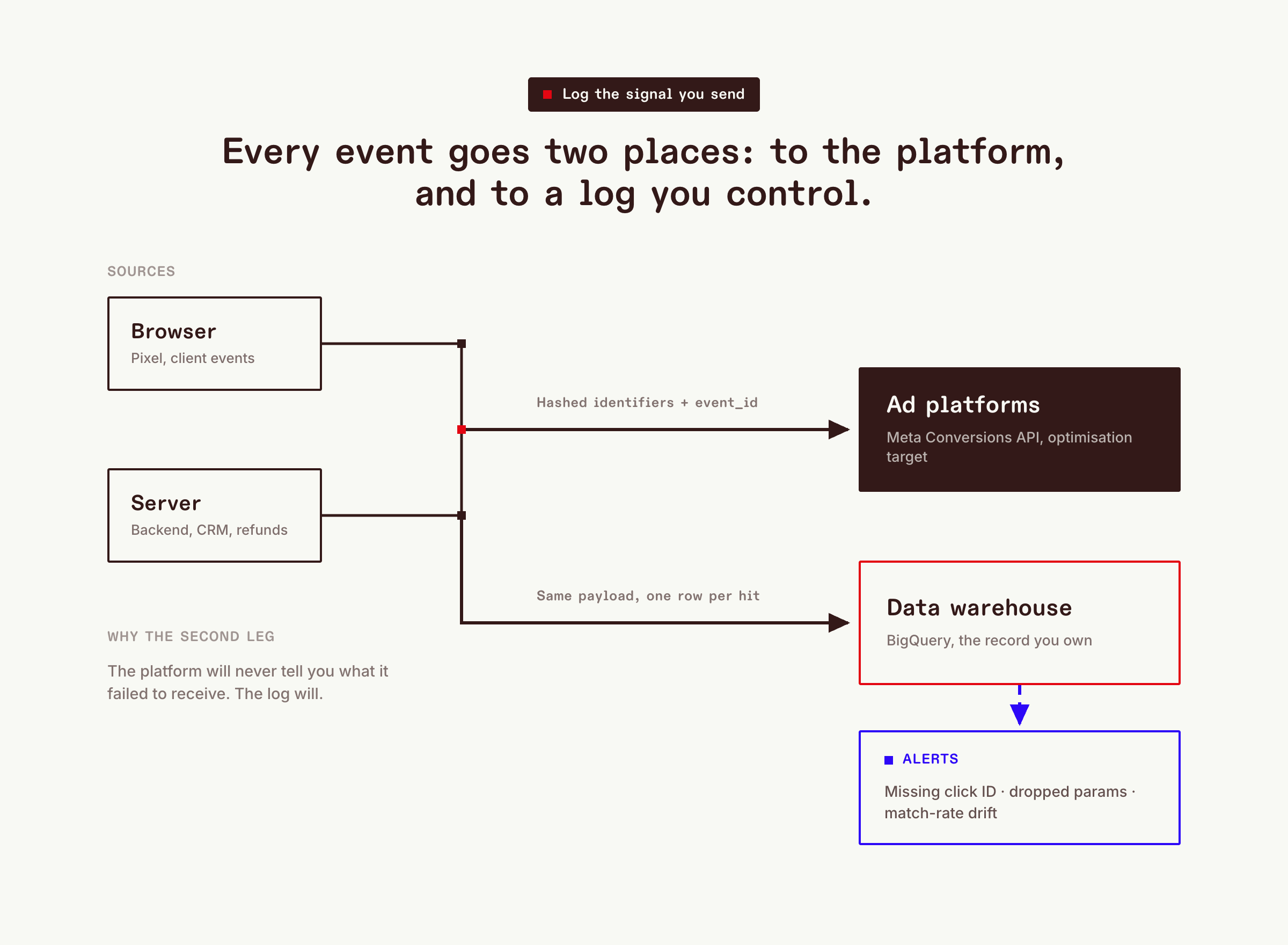 Without the warehouse leg, a broken signal looks exactly like weak demand and you spend three weeks optimizing creative instead of fixing a parameter.
A few honest limits
None of this gives you a perfect number. Match quality, deduplication, and attribution all leave gaps, and the point isn’t to close them, it’s to know where they are and stop them moving without you noticing. A lot of what we do on client audits is exactly that: go in deep, work out what’s actually working, and hand back something the marketing team can read and trust, especially when data and marketing aren’t speaking the same language about why the numbers moved.
If you want to work through where your own CAPI setup is leaking, or which of these three problems you’re most likely sitting on, book a call with us.
You can watch the full session on demand here.
More articles like this?
Enter your email below to receive our latest articles on marketing measurement:


 Future articles